Main stages of website development
Step-by-step instructions for creating a website. A list of main steps that will help you make a website correctly and efficiently. Article by Veonix design studio.

“Are you there at all? Website for a million?! Freelancers will do it for 50 k and in a week we will launch it!”
Was it? Was! The fact is that the client sees only the facade: www.bushcha-kompaniya.ru, header, texts, “Leave a request” button, two clicks and everything works. And no one knows what is left behind the scenes.
-
How many home screen options have been thrown into the trash?
-
How many cups of coffee did the designer drink while he was remaking “beautiful, but not right?”
-
How many hours did it take to test so that everything worked on both the iPhone 15 and the ancient Xiaomi in the default browser.
-
How many A/B hypotheses had to be tested to find out that “Services” should be better called “How can we help” and get +27% in clicks.
-
And finally, how many people were in the team that worked on the resource from idea to first order?
Nowadays, creating a website is available to anyone - and you don’t need to be a designer, developer or layout designer. Just choose a free constructor (Tilda and analogues) and build from ready-made bricks and blocks. But if you want a multi-page corporate portal with a blog, online store and the ability to scale, which will confirm your expertise, improve your reputation and attract clients, this is already the big league. The article explained how we make websites that bring traffic, sales and real money.
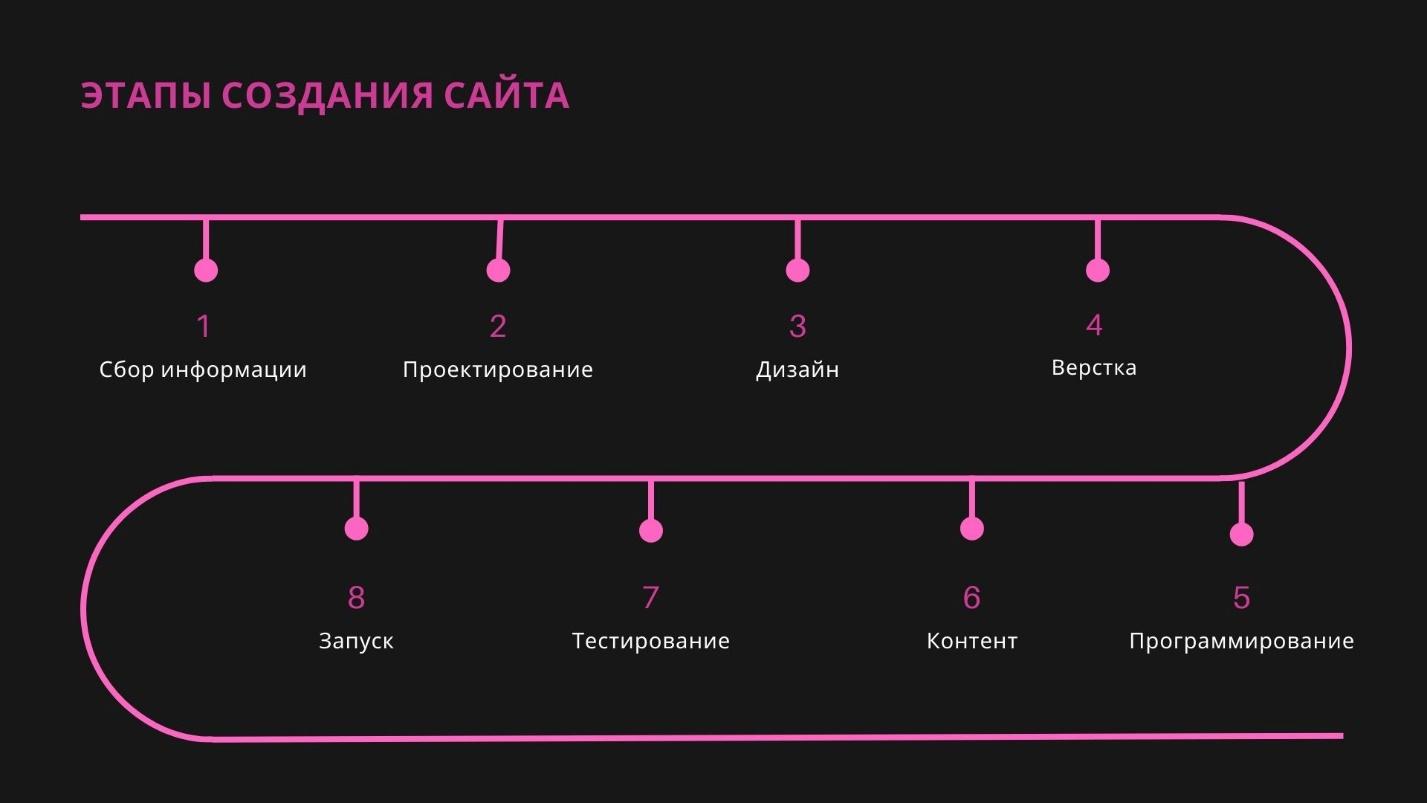
Preparatory stage
At Veonix, a team is responsible for website development: analysts, marketers, copywriters, designers, Middle and Senior programmers, testers and a manager who always knows at what stage the project is. Therefore, yes, we are more expensive than freelancers. But you don’t have to worry whether the texts and forms comply with the latest changes in the laws “On Advertising” and “On Personal Data”, whether the layout on the old smartphone of the tender director will fall apart and whether the “Submit” button will fly off when connecting the CRM.
So that the team has something to work with, we need input: the concept, texts, design are created from scratch specifically for your company. Therefore, the first thing we ask you to do: fill out brief. In it you tell what your company does, who your clients are, whether there is a logo and a brand book, whether photos are needed, whether there will be a blog, whether a catalog is needed. We will study the information, conduct our research of the market, niche and your competitors, collect a pool of questions and invite you to an interview, where we will talk about the goals and expectations from the site.
At the end of this stage we have an understanding:
-
what kind of project is this;
-
for whom is it created?
-
for what purpose;
-
through what entry points;
-
how to evaluate the result.
Even if a client comes with a request for a business card website, and then it turns out that he wants to sell a franchise, maintain a blog, collect applications, broadcast information in three languages and integrate with 1C - we are ready for this, because we will find out all this at the preparatory stage.
Design
Each stage of website creation goes through two stages: first divergent (when we generate a lot of options), and then convergent (when we select the best solutions from everything). This is how intermediate results are obtained, from which the final product is then assembled.
During the design process, we get together with an analyst, a UX designer, a manager (and sometimes a copywriter) and first sketch out 10 architecture options simply on an A4 sheet. We discuss, edit, draw again, and when we come to a common denominator, we transfer the sketches into digital form. So far without color and web design, but with page logic, clickable blocks and buttons. This makes it more convenient to present the prototype to the client: in co-editing mode, he can test and ask questions, and we immediately edit.
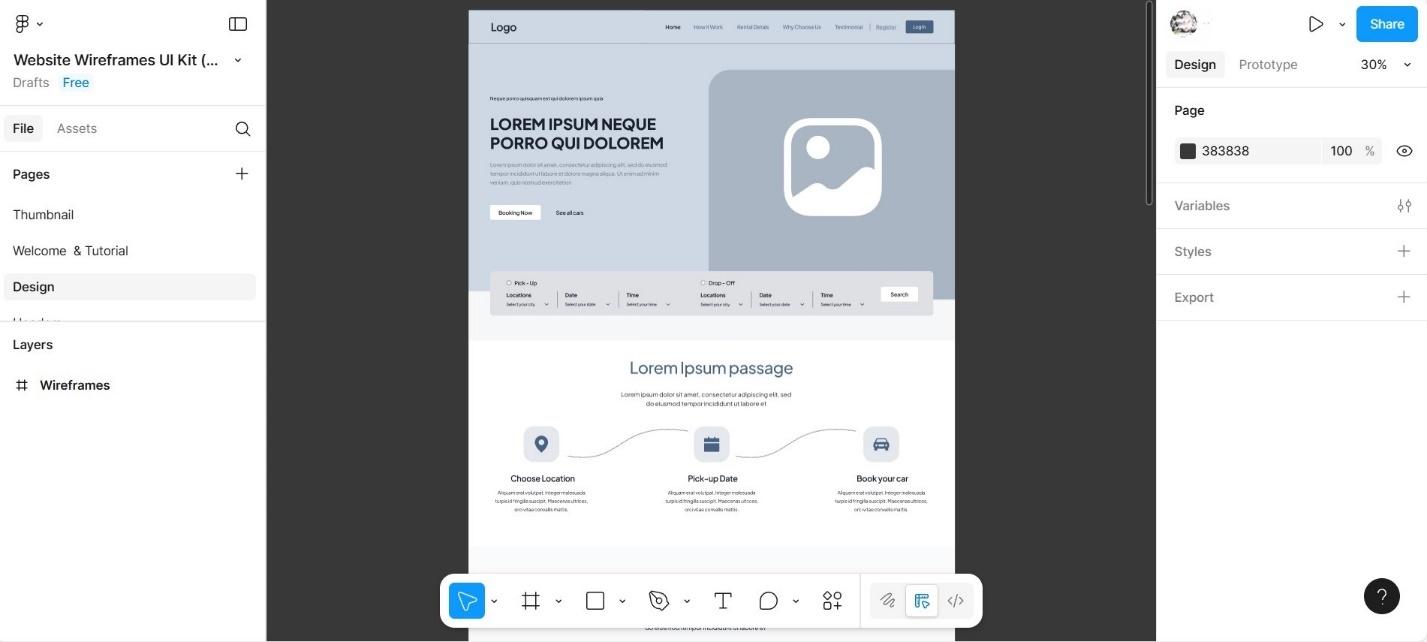
The prototype can also be created in free constructors, for example, in Figma.
At the end we get the final prototype, also known as a site map, which answers four questions: what is on the page, why it is there, where it is located and how it works. If necessary, you can add a new block, rearrange priorities, embed a landing page for a franchise or a filter by product type. But it’s better to coordinate and think through everything now; alterations at the next stages of development will be longer and more expensive.
Design
When the logic is built, you can move on to the mood board. It is a communication tool that helps convey the emotion and tone of a site. We collect references both in search results, when we see successful solutions, and externally: for example, from the works of artists of the Renaissance period or from the Transformers franchise, taking into account the data collected at previous stages. We focus on the brand book, if there is one, corporate colors, company values, if the client is satisfied, we move on.
Based on the prototype and taking into account the moodboard, we assemble layouts: first for the main page, then standard pages. In the process, everything goes through an internal filter - fellow designers, art director, project manager. At this stage, we select a font pair, icons in the same style, and arrange color accents. If the content is already ready, we insert real texts and images to check whether it is convenient to read and whether the meaning is not lost in the visual.
We adhere to proven principles:
-
We are not creative for the sake of creativity, every decision is supported by logic;
-
we use standard grids and behavior patterns that users are accustomed to (menu at the top, logo on the left, clickable number, shopping cart in the right corner);
-
We maintain visual hierarchy: we highlight important elements and do not focus on unimportant ones;
-
we place CTAs at expected points and make them noticeable.
We definitely take into account adaptability: layouts are immediately designed for several resolutions so that the site is equally convenient on a laptop, tablet and phone. We separately fix areas for animations and micro-interactions: where buttons should be highlighted, where smooth scrolling or a slider should appear.
After internal review, the layouts are presented to the client, and when everything is approved, the next stage of development will be technical implementation. It consists of several parts, the first of which is layout.
Layout
Layouts are turned into HTML/CSS pages that look like the future site. The work is happening locally or on a test server; the site is not yet on the Internet, but it can already be opened in a browser.
The layout designer creates the structure of the page using HTML - arranging headings, text, images, blocks. CSS is responsible for styles: fonts, colors, indents. JavaScript adds interactivity: drop-down menus, pop-ups, sliders, smooth effects. Finished pages are tested on different devices and browsers, and then sent for integration with the CMS.
Programming
The frontend programmer revives the layout: sets up form validation so that you can’t write “I’ll call you later” in the e-mail field, and the phone number is formatted on the fly into the beautiful +7 (999) 123-45-67. He orders the calculator to load tariffs through the transport company’s API and calculate the real cost of delivery, and the catalog to filter products without reloading the page: enter “blue sneakers up to $50” and scroll through the results.
At the same time, the backend developer is engaged in the integration of the layout with the CMS, in our case it is 1C-Bitrix, a Russian platform with a lot of capabilities out of the box. Among them are a large number of additional modules, support for scaling from the landing page to the portal like Sber, connecting CRM, payment systems, etc. Bitrix is your admin panel, where you can change the text on the main page in two minutes without touching the code, add a promotion in a few clicks, or download 500 products directly from Excel.
The backend programmer configures all server logic. Feedback forms should actually send letters to the post office (and not into space), the personal account should remember the history of orders, and the system should load balances in the process and remove goods from sale if they are out of stock.
Bitrix has already taken care of basic security - a proactive filter blocks SQL injections and XSS attacks, passwords are hashed, and data is transmitted over secure channels. But we're upping the ante: setting up access rights so that a content manager can't accidentally delete half the site, checking uploaded files in case someone tries to upload a virus instead of a price list, and making sure that forms don't break even if someone writes “yes” in the “Your phone number” field.
Filling with content
If you ordered texts and photographs from us, this stage will take a minimum of time: everything is already ready, all that remains is to coordinate and post. If you do it yourself, think carefully about whether it’s worth it: blurry photographs in a dimly lit office will not increase sales, and both you and your competitors will have stock images. We saw the same guy wearing headphones on the bank’s website, in the dental clinic, and in the taxi service - just a one-man orchestra.
As for texts, both search engines and people should like them, but you cannot copy articles from competitors: firstly, this is theft, and secondly, Yandex and Google perfectly see duplicates and lower such sites in the search results. And a neural network without the right prompts will generate such masterpieces that you will then have to justify to clients for “25 years on the market” for a company opened last year, or for “own production in Switzerland” for an individual entrepreneur from the Moscow region.
Testing
In fact, we test the project after each stage, but now we are talking about the final one, one step away from launch. We check once again for correct operation in different browsers - large state corporations still use Internet Explorer, which was last updated when Medvedev was president. Be sure to look at different devices, special attention to forms, so that a grandmother with a tablet from the 2000s can order gifts for her grandchildren. We do testing with maximum load: for example, a popular blogger wrote about you and all his millions of subscribers rushed to look. We check all integrations, make sure that letters arrive and payments go through. And of course, loading speed, if the site opens for more than 3 seconds, half of the visitors will spit and leave.
Preparing for launch
First of all - domain and hosting. If the domain already exists, check who it is registered to. Very often it is registered to a retired employee who is now out of reach, or to a web studio that closed three years ago. Ideally, transfer everything to the owner company. Hosting must meet the real needs of the business: how many visitors will be on the site, how large the database is, whether backups are needed (spoiler: they are!).
An SSL certificate is a must-have in 2025. Without it, the browser will swear in red, and Google and Yandex will lower their positions in the search results. The free Let's Encrypt is still relevant, but when working with personal data or if you have an online store, it is better to get a paid one. You also need to set up analytics, at least Yandex Metrica. Analytics systems will show where customers come from, where your weaknesses are, and what your overall performance indicators are.
Robots.txt and sitemap.xml are files that everyone forgets, and then they wonder why the site is not indexed or, on the contrary, the cart and personal account pages appeared in the search. Robots.txt tells search engines where they can go and where they shouldn’t. Sitemap.xml helps robots find and index pages faster.
At the same stage, mail and notification settings are set: the abbreviations SPF, DKIM, DMARC tell mail servers that the letters are real and not spam. And most importantly - backup, automatic backups will be your salvation when something breaks.
Launch
The main rule is never, hear, NEVER launch on a Friday evening. Something will definitely go wrong, and you will have to fix it on the weekend. It is better to transfer a website from a test server to the main one at night or early in the morning, while traffic is minimal and you can make final changes before users wake up.
For the first hours after launch, we keep everything under control: we check the server logs, look at email, monitor the load, and monitor the behavior of the first users in Yandex Metrica. If necessary, we will prepare guides so that the content manager can add news in real time, and the director can easily find statistics.
The site has been launched, but the work is just beginning.
Support and development
Our clients receive lifetime support. This means that if a bug appears in 5, 10 or more years, we will fix everything. But projects are growing and need to be scaled up: add a blog or catalogue, integrate with ERP, translate pages into other languages, connect loyalty systems, and so on. Bitrix allows you to expand the structure and add new modules without migrating to other content management systems. Check out our portfolio, in the cases we talk about website development from scratch, audit, modernization and redesign of outdated projects.
Optimization and promotion
For a site to be profitable, it must be everywhere: on the first page of Yandex and Google, in the Product Gallery, in Alice’s neuroresponses, and so on. Promotion work begins after launch, but the foundation is laid at the filling stage: texts are written taking into account semantics, the structure is built for search queries, cards and pages are optimized for indexing.
When the site is already online, contextual advertising is set up, social media targeting is enabled, and remarketing formats are tested. All this is tied to analytics: for effective promotion We track conversion, adjust creatives and bids so that traffic turns into orders. The website becomes the main point of the sales funnel: some customers come organically, some through advertising, and together this gives a stable flow of applications and increased profits. Advertising campaigns are constantly monitored and tested by our specialists in order to increase CTA and reduce CPL.
Features of different types of sites
Any website solves a specific business problem. For example, a landing page is needed to quickly convey an offer and lead the client to an application. In the online store, the first priority is a well-thought-out catalogue, a filter system and a convenient shopping cart with online payment. Media and educational projects require smart architecture, quick search through thousands of publications, linking, even a casual user should stick here and subscribe to updates. The approach to creating a website depends on this, so the question is clarified immediately during the first interview.
Common Mistakes
-
We saved on promotion - the site is beautiful, everything is great, but you can only find it through a direct link.
-
If you made it using templates, your clients now and then end up going to a competitor with the same design (and he didn’t skimp on promotion!).
-
We did not check adaptation for smartphones. In bed, Yulia remembered that she had not ordered a bag for the pool, opened your website and went to the marketplace.
-
Forgot about download speed. The site takes so long to open that you can hear the dial-up modem beeping.
-
Launched and abandoned. Without updates, any project turns into a digital museum exhibit.
Modern trends
In 2025, they often create a mobile version first, and then adapt it for large screens. Among the main trends are large headlines that fill the entire monitor, animated 3D objects that react to user actions, longreads with scrolling, display fonts (unusual, to attract attention), as well as newspaper layout, nostalgia for Y2K, hand-made design and custom cursors. Don’t forget about environmental responsibility: sites load faster, don’t eat up traffic and don’t heat up data centers unnecessarily.