
Itten’s Color Wheel in Practice: 6 Schemes That Turn Choosing Colors from Torture into a System
Itten’s color wheel is a 12-color tool for building harmonious palettes. Learn the 6 schemes, the 60:30:10 rule, common mistakes and the best online tools.

Itten’s color wheel is a 12-color tool that the Swiss artist and educator Johannes Itten designed specifically for finding harmonious color combinations. It is easy to use: take one of six shapes — a line, a triangle, a square — lay it over the wheel, and the points it touches tell you which colors go together.
Sound familiar? You need a palette for a website, an interior or a package, and all you have is a vague “I want something beautiful.” Itten’s color wheel turns intuition into a clear method, which is why interior designers, web designers, stylists and marketers all rely on it.
Key takeaways:
- Itten’s color wheel is built from 12 colors that grow out of three primaries — red, yellow and blue.
- Six geometric schemes — complementary, split-complementary, triadic, analogous, tetradic and monochromatic — give you ready-made harmonious combinations.
- The method is simple: choose a main color → choose a scheme → fine-tune the shades.
- The 60:30:10 rule works universally, whichever scheme you pick.
- Test your final palette in Adobe Color or Coolors before you sign it off.
What Itten’s color wheel is and why you need it
Itten’s color wheel is a system of color relationships that moves palette selection from guesswork to formulas. Instead of wondering whether turquoise goes with orange, you simply look at the wheel and get an answer backed by decades of practice.
Color as a science began long before Itten: Isaac Newton split light into a spectrum, Goethe wrote a treatise on the psychology of color, and Itten brought these ideas together into a coherent system while teaching at the legendary Bauhaus school of design, later setting out his theory in the 1961 book “The Art of Color”. Harmonious combinations deliver concrete results: they shape emotional response, make information easier to read and place accents exactly where the eye should land first.
Where the color wheel is used: from web design to interiors
For designers, the color wheel is a master key that opens any lock where color is involved:
- Interior design — building a room palette: walls, textiles and accent furniture come together as one composition instead of a visual jumble.
- Web design — buttons, accents and interface elements get well-considered color pairs instead of a random set of shades.
- Fashion — putting together outfits whose pieces support each other visually rather than competing for attention.
- Marketing — branding and packaging use color as a language that is read faster than any slogan.
- Graphic design — illustrations and posters use color schemes so the composition doesn’t fall apart into separate patches.
- Photography — color grading relies on the same principles of harmony as painting did two centuries ago.
How Itten’s color wheel works: from 3 colors to 12
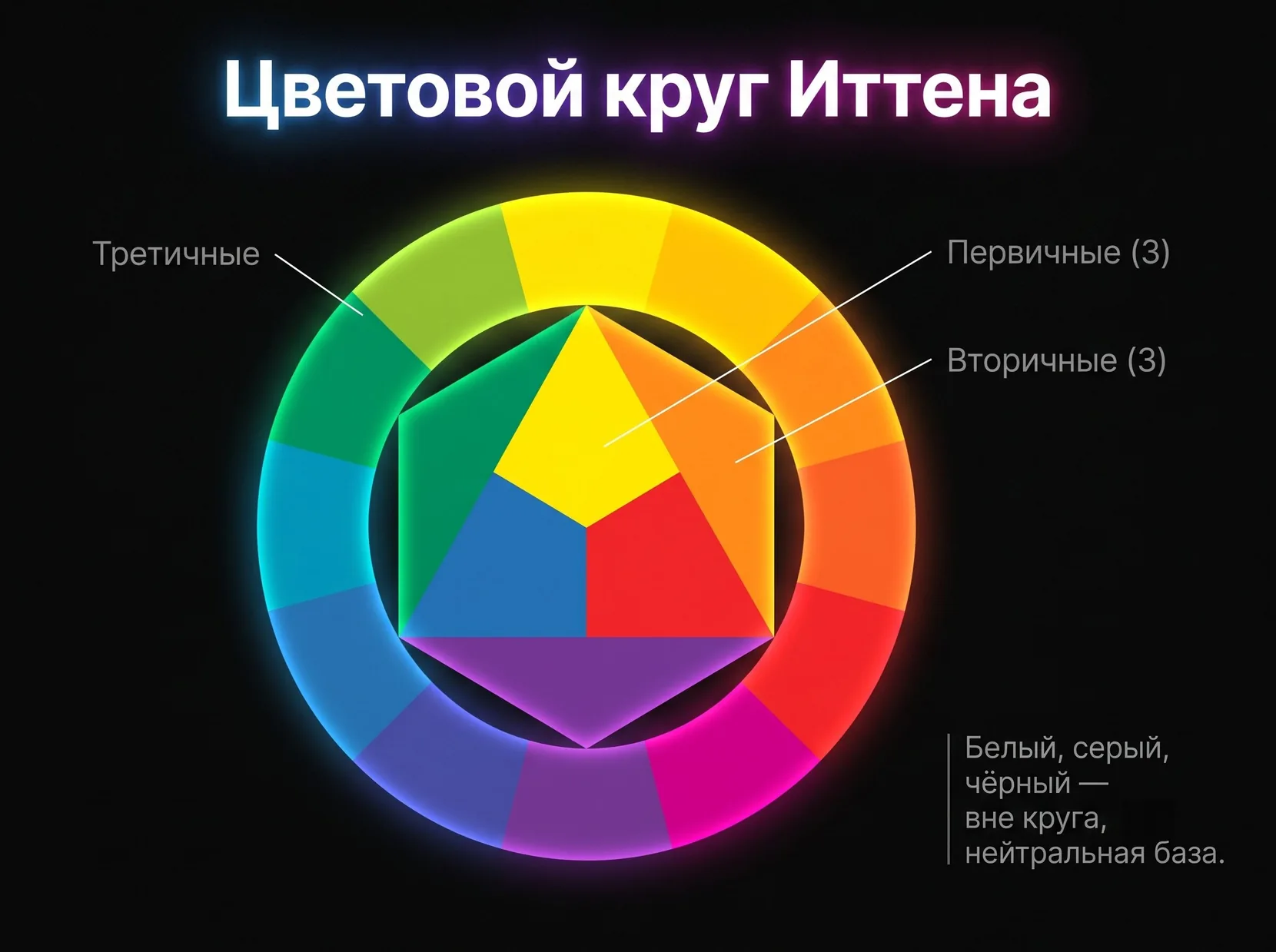
The wheel is built like a set of nesting dolls: three primary colors produce three secondary ones, and together they give six tertiary colors — exactly 12 in total.
At the center sits a triangle of the three primaries — red, yellow and blue. Mixing them produces the secondary colors: red plus yellow becomes orange, yellow plus blue becomes green, and blue plus red becomes purple. Next come the tertiary colors, which result from mixing a primary with its neighboring secondary: red plus orange, for example, gives red-orange. As a result, all twelve hues line up in order around the outer ring of the wheel.
White, black and gray are not part of the wheel — they stand apart as a neutral base that helps you make any chosen color lighter or darker. One more thing worth keeping in mind: Itten’s wheel is based on the subtractive model of mixing paints, unlike the additive RGB model used by screens, so the same formulas can look slightly different “on paper” and “on a monitor.”
6 proven color schemes based on Itten’s wheel

Geometric shapes laid over the wheel work like a stencil: place the right shape, and the points it touches instantly show you harmonious colors.
Complementary scheme (opposite colors)
Two colors directly opposite each other on the wheel give maximum contrast — these pairs are called complementary. The classic examples are red and green, blue and orange, and yellow and purple.
This scheme works brilliantly for CTA buttons and bold brands that need to catch the eye in the first second. One caveat: in equal proportions, a complementary pair starts to literally “vibrate” and tire the eye, so practitioners stick to a 70:30 ratio. A blue background with an orange “Buy” button, for instance, looks far calmer than the two colors in equal measure.
Split-complementary scheme (contrasting triad)
Instead of the directly opposite color, you take the two colors next to it, so on the wheel the scheme forms something like a fork. The result: the contrast of a complementary pair is softened, but the energy stays.
A good example is blue paired with yellow-orange and red-orange. The scheme is a great fit for landing pages that need to hold a visitor’s attention without overwhelming them with an aggressive color clash.
Classic triad (triangle)
Three colors equally spaced around the wheel form an equilateral triangle and strike a rare balance of harmony and variety at the same time. The primary triad — red, yellow, blue — feels energetic and playfully childlike; the secondary triad — orange, green, purple — is softer and calmer.
This scheme is often used in illustration, design for children and high-energy brands. A practical tip: let one color of the triad dominate and the other two play a supporting role, otherwise the composition starts competing with itself.
Analogous scheme (neighboring colors)
Three to five colors sitting next to each other on the wheel create a calm, natural palette with minimal contrast, much like the sky shifting from one shade to the next at sunset.
This scheme is a gift for interiors where coziness matters more than a bold accent: a blue-green palette for a bedroom, for example, feels relaxing at first glance. When you use five colors, make sure the shades differ in brightness, or the palette may blur into a single patch.
Tetradic scheme (square and rectangle)
Four colors make this the richest palette of all six schemes — and the riskiest. A square tetrad uses four equally spaced colors, while a rectangular tetrad uses two complementary pairs at once.
An example of a rectangular tetrad is red, orange, blue and green together. The rule you already know from the classic triad applies here: one color dominates, the other three act as accents. Designers choose this scheme for complex illustrations, festive design and fashion collections that call for visual density.
Monochromatic scheme (shades of one color)
One color plus its variations in saturation and brightness is the safest and most elegant scheme of all. It works through tints (lightening), shades (darkening) and tones (muting) of the base hue.
Brands with a strong signature color favor this approach: a banking website kept in shades of blue, from navy headings to a pale blue background, is instantly recognizable and looks cohesive without a single unnecessary hue.
If you want to apply these schemes not just to a website but to a complete brand identity, from the logo to branded materials, the Veonix team can take on corporate identity design for you, including choosing the right color palette for the task.
A step-by-step method for building a palette with Itten’s wheel
Building a palette is a five-step method that takes five to ten minutes of work — no need to wait for creative inspiration.
- Define your main color. Start from the task and the psychology of perception: red conveys energy, blue conveys trust, and green suggests nature and calm.
- Choose one of the six schemes to suit the task. Need contrast? Go complementary. Need calm? Go analogous.
- Find the colors on the wheel. Lay the matching geometric shape over the wheel and note the points it touches.
- Fine-tune the shades. Play with saturation and brightness (tint, shade, tone) so the palette feels alive rather than like textbook theory.
- Apply the 60:30:10 rule. The dominant color takes up 60% of the composition, the secondary color 30%, and the accent color the remaining 10%.
Here is the rule in action: 60% gray background, 30% blue as the main color and 10% orange for accents — a simple formula that already looks like a finished design project. Before you sign off on a palette, it is worth checking it in any online tool: on a monitor, the eye often sees something quite different from what you pictured in your head.
Common mistakes and online tools for working with the color wheel
Most color mistakes come down to one thing: every shade is used in equal proportions, and the palette turns into visual noise with nothing for the eye to hold on to.
- Too many equally weighted colors — the fix is simple: let one color clearly dominate and the rest follow its lead.
- Complementary colors in equal proportions — the palette starts to “vibrate”; a 70:30 ratio saves the day.
- All colors equally saturated — the palette looks flat; vary tints and shades to add depth.
- Forgotten neutrals — white, gray and black are the “breathing room” of a palette; without them, the composition suffocates.
- No testing on real media — color looks different on a screen and in print, so test both before you finalize.
Online tools for working with the color wheel
You can test a palette and find combinations for free — four tools cover almost any task a designer faces.
| Tool | Key feature | Best for | Price |
|---|---|---|---|
| Adobe Color | All 6 schemes + extracting palettes from photos | Designers working in the Adobe Creative Cloud ecosystem | Free |
| Coolors | Fast palette generation and export | Anyone who needs speed and inspiration | Free + Pro version |
| Paletton | Strict adherence to the classic wheel schemes | Designers who work with Itten’s theory | Free |
| Color Hunt | Ready-made trending palettes from the community | Anyone looking for a ready solution without building it by hand | Free |
Adobe Color wins where precision and work with the wheel’s schemes matter, while Coolors is indispensable when you need to sketch out a few options quickly for inspiration.
Building a palette by hand can be fun, but sometimes it is faster and safer to hand the job to professionals — for example, when developing a logo and brand identity, where color becomes part of how people recognize the brand for years to come.
Frequently asked questions
Can I use more than five colors in one palette?
Technically, yes, but the more colors you add, the harder it is to keep the balance — even a four-color tetrad needs a clear hierarchy. Beginners are better off sticking to three or four colors until they feel confident with more complex combinations.
Does Itten’s wheel work for on-screen colors if it was designed for paint?
The principles of harmony stay the same, but specific hues in RGB and in the subtractive paint-mixing model can sometimes look different. That is why a final digital palette should be checked on screen, not just in theory on a paper wheel.
Which scheme works best for a logo?
There is no one-size-fits-all answer: a monochromatic scheme conveys rigor and memorability, while a complementary one adds energy and contrast. The choice depends on the brand’s character and the emotion the logo should evoke at first glance.
Should I follow Itten’s wheel to the letter, or can I deviate from the schemes?
The wheel is a working tool, not a rigid law of physics. Experienced designers often shift the points on the wheel slightly for a more lively result, but it makes sense to start with the strict schemes to develop your sense of color.
How does Itten’s wheel differ from other color models such as RYB or HSV?
Itten’s wheel is based on the classic RYB (red-yellow-blue) model and is intended specifically for artistic and design work. HSV and RGB are technical models for screens and software; they are structured differently and solve different problems.